Jobs That Get Found, Read and Applied To
Every job page speaks Google for Jobs in Japanese and English. Descriptions start from what the market actually lists for the role. And a job that would say something untrue can't go live.
Real screens from Mizuhiki Search, a demo agency. Every name and figure on them is a sample.
See Each Tool at Work
Walk-throughs on real screens
Job descriptions
Job Descriptions Built from What the Market Lists
Job search
Job Search and Job Pages Candidates and Google Can Read
Job distribution
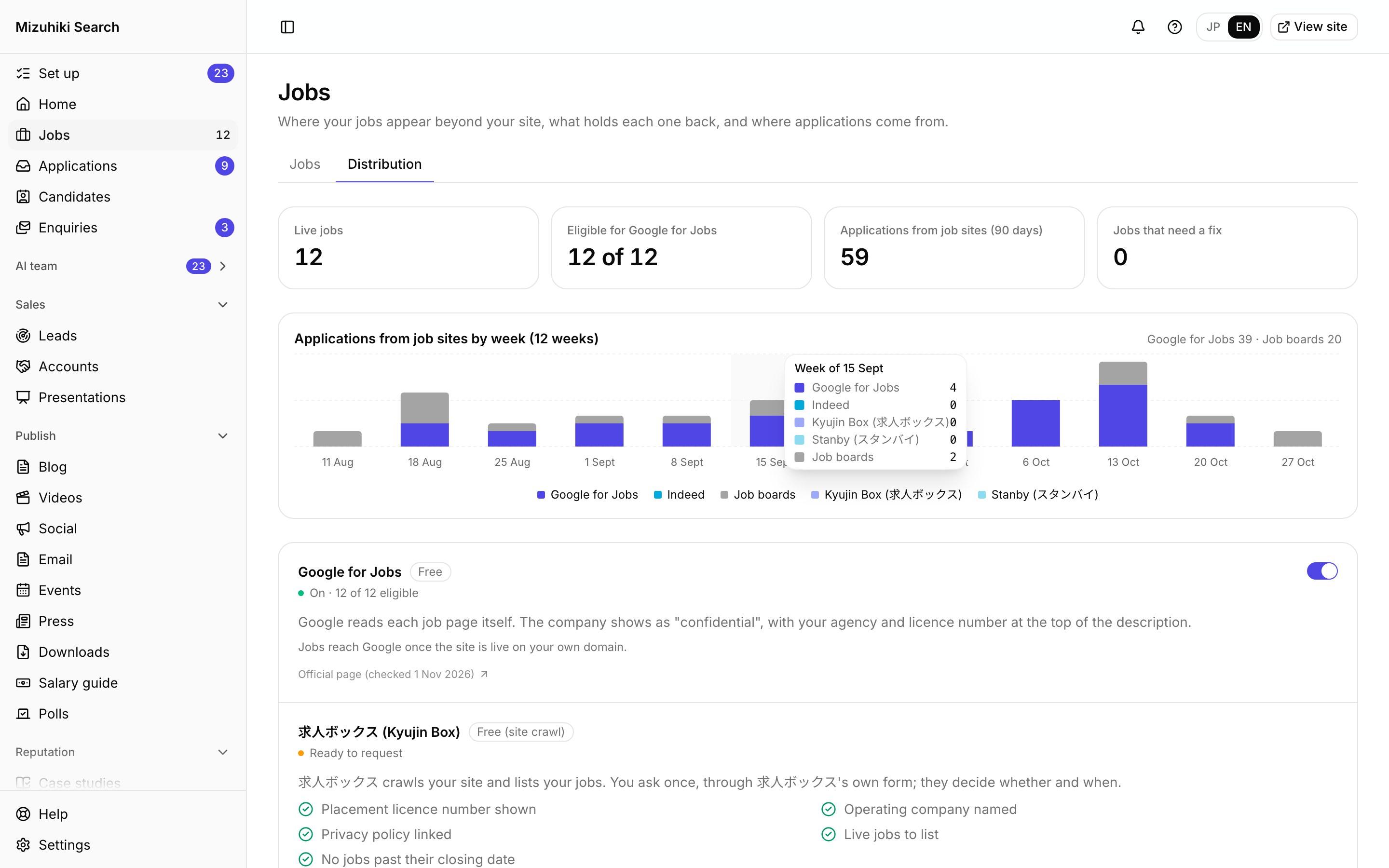
Google for Jobs, Kyujin Box and Indeed from One Place
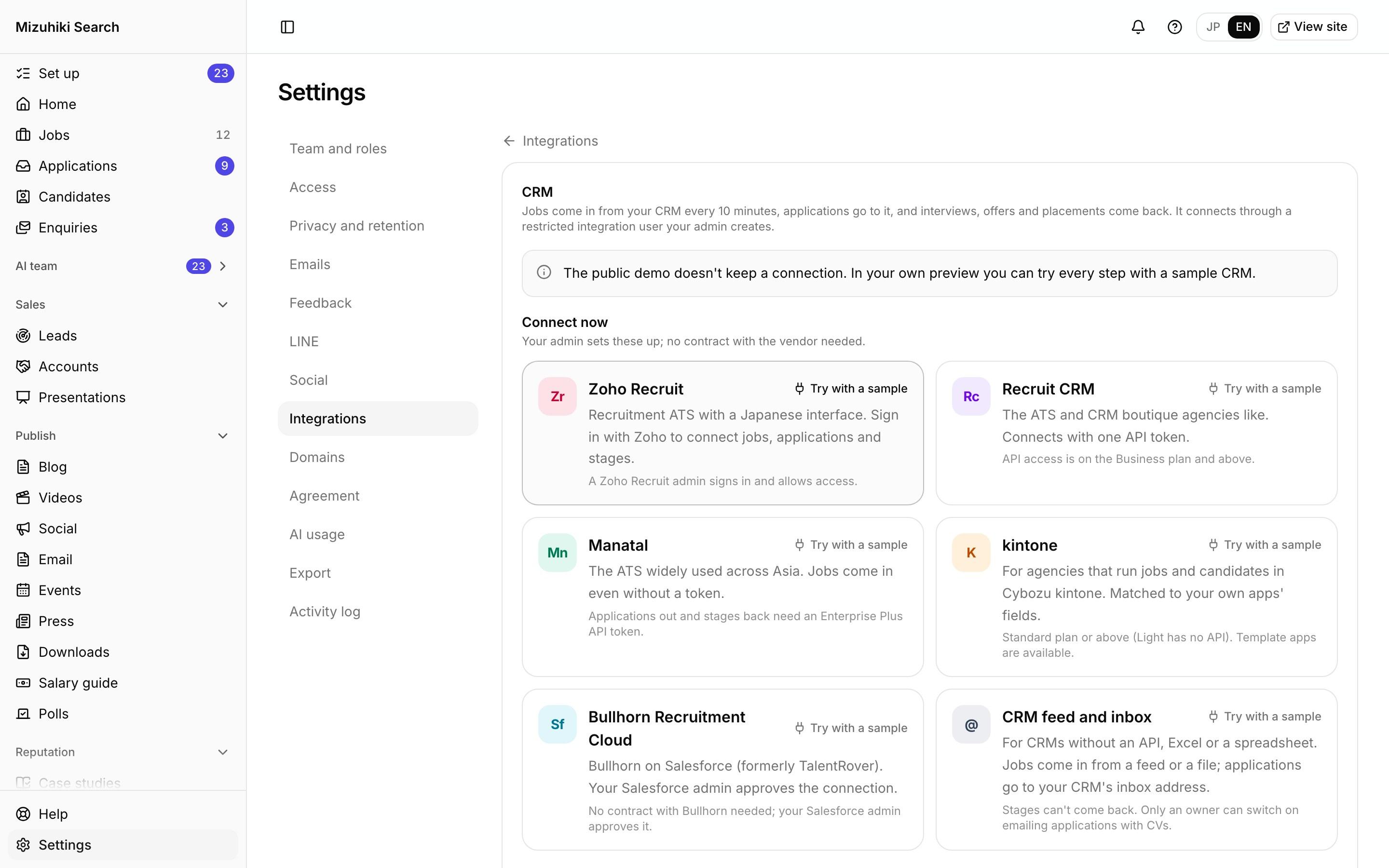
CRM
Jobs In from Your CRM, Applications Back
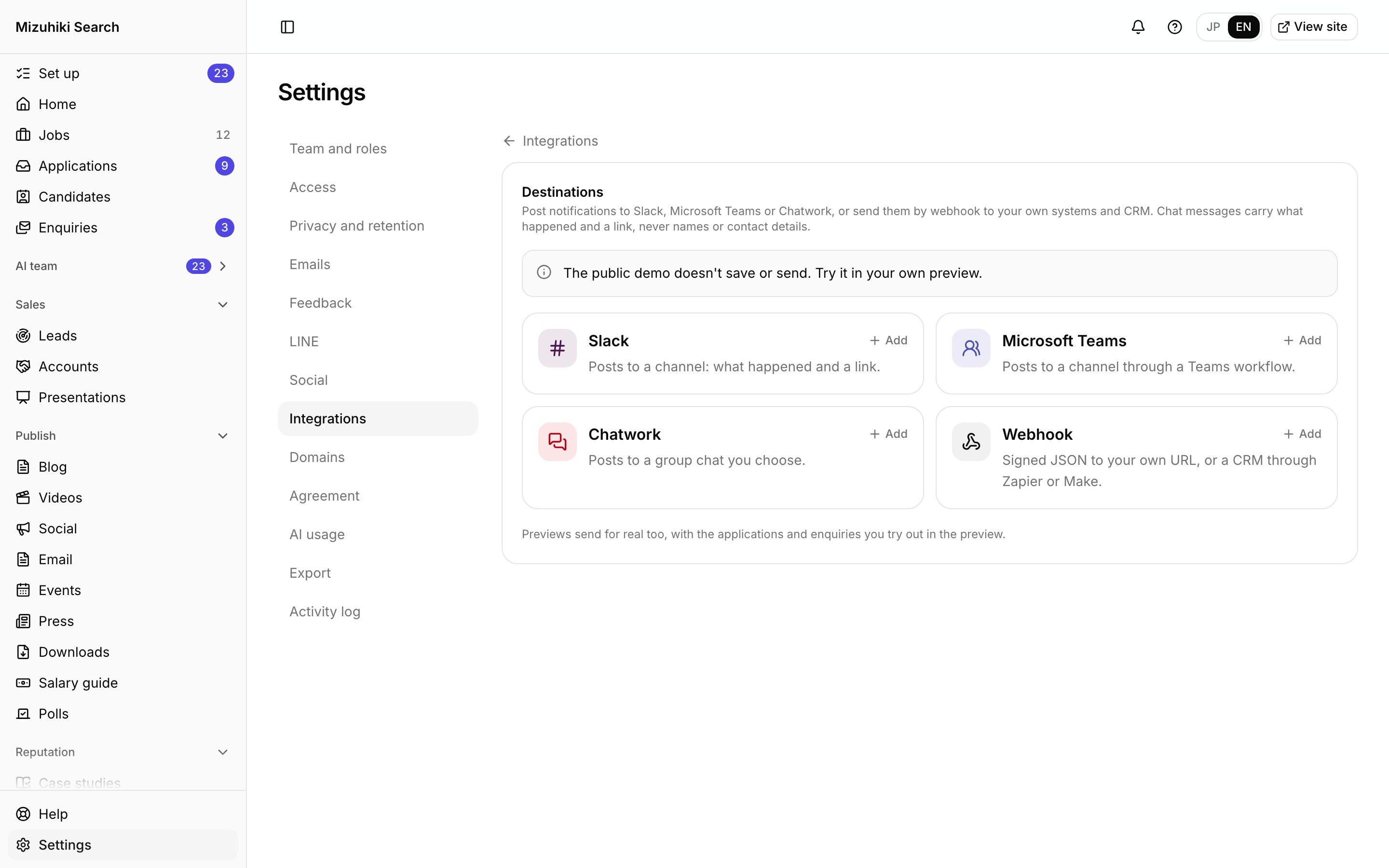
Team alerts
New Applications in Slack, Teams and Chatwork
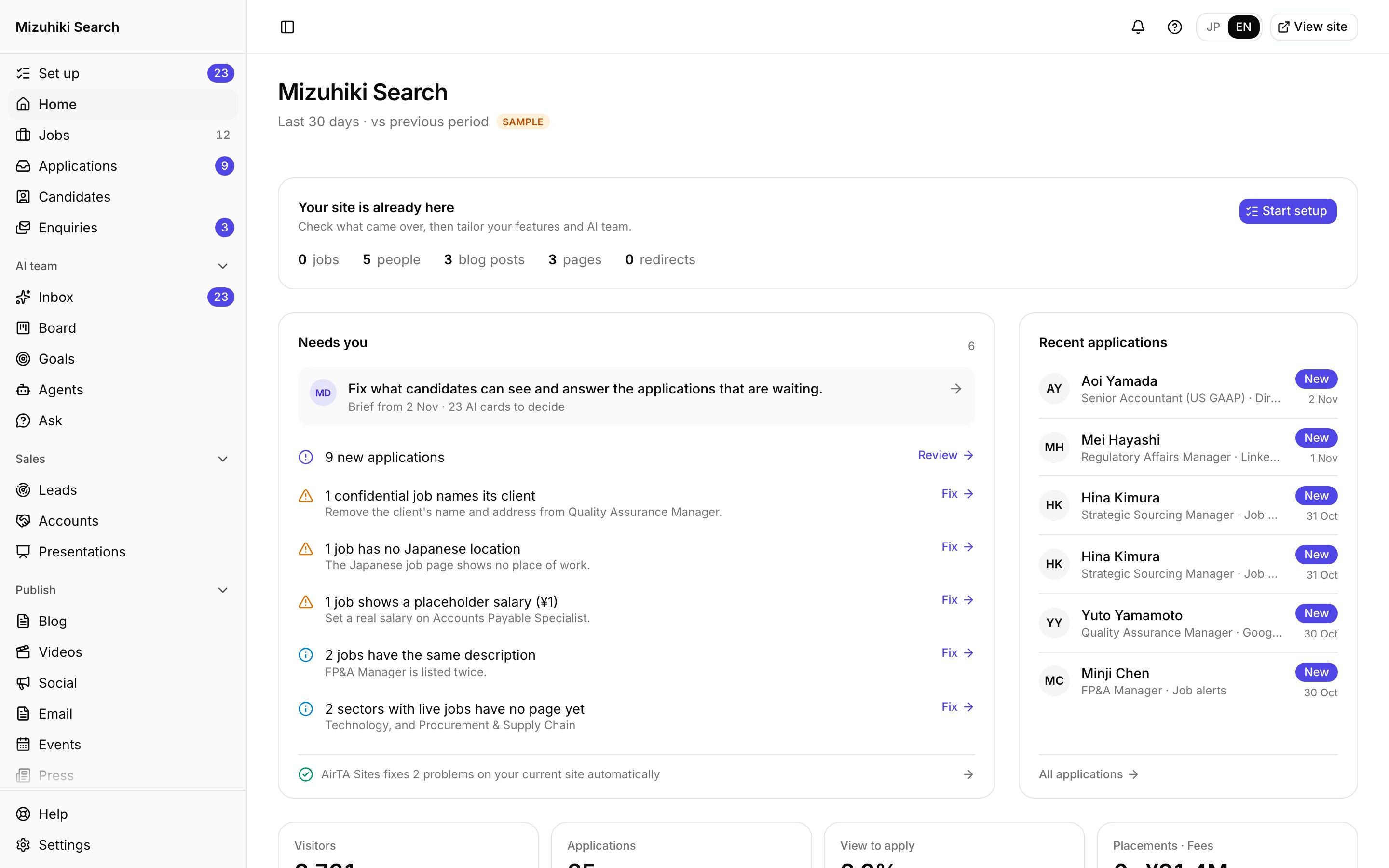
Admin
One Admin for Your Whole Agency's Marketing
Considering job postings?
Post the Searches You Can, Keep the Client Confidential
Many executive search agencies never post a role, for good reasons. Here is what posting brings, what agencies worry about, and how each worry is handled.
Found by people who aren't looking yet
Senior people search for roles like theirs long before they call a recruiter. Each posting is its own page that Google for Jobs lists, in Japanese and English.
Every applicant joins your database
An applicant who doesn't fit this search arrives as a candidate record with their CV, ready for the next one.
No fee per applicant or per hire
Job boards and scout services charge for access to candidates. A candidate who applies on your own site costs nothing more.
Minutes from brief to posting
Paste the client's job description and the posting is drafted in both languages, with the client described and never named.
A client could be identified
The Jobs Editor checks every posting every night for the client's name, and every title for a unique product, a landmark office or "the only company with…", and brings each one to you.
Some searches can't be public at all
Post only the roles you choose. A search that has to stay private can stay a draft for its whole life, while the rest of your searches are posted with the client unnamed.
Postings go stale
Each posting has an end date, and a role past it leaves the site on its own.
Rules on what a job posting can say
The accurate display checks run on every publish, so a posting that would say something untrue or leave out a required term can't go live.
The client's brief
Sample- Country Manager, Japan, at Nimbus Data, the only lakehouse vendor with FedRAMP High.
- Reports to Dana Whitfield, SVP APAC, based in Singapore.
- Opening the Roppongi Hills office in April with a team of 12.
- Package around ¥35,000,000 a year plus equity.
Marked: details that would identify the client.
As posted
Sample- Country Manager, Japan, at a US data infrastructure company preparing its first Japan office.
- Reports to the APAC leader.
- Central Tokyo, building a team of 12.
- Package around ¥35,000,000 a year plus equity.
The role, the level and the package stay. Nothing points to the company.
Try it
Fix This Job Before It Goes Live
An imported job with mistakes we found on real agency sites. Edit it and watch the same rules the editor runs clear one by one.
Job editor
Checks
2 to fixSalary under ¥1M (a placeholder?)
Enter the real annual salary, or mark it Competitive.
The end date has passed
Extend the end date if the role is still open, or set the job to Closed.
Location missing in Japanese or English
Place of work is a detail a job ad should state.
The title has broken characters (like |)
Replace them with the real characters.
Red checks stop a job going live, because the ad would say something untrue (the accurate display rules). Grey ones are details a job ad should state.
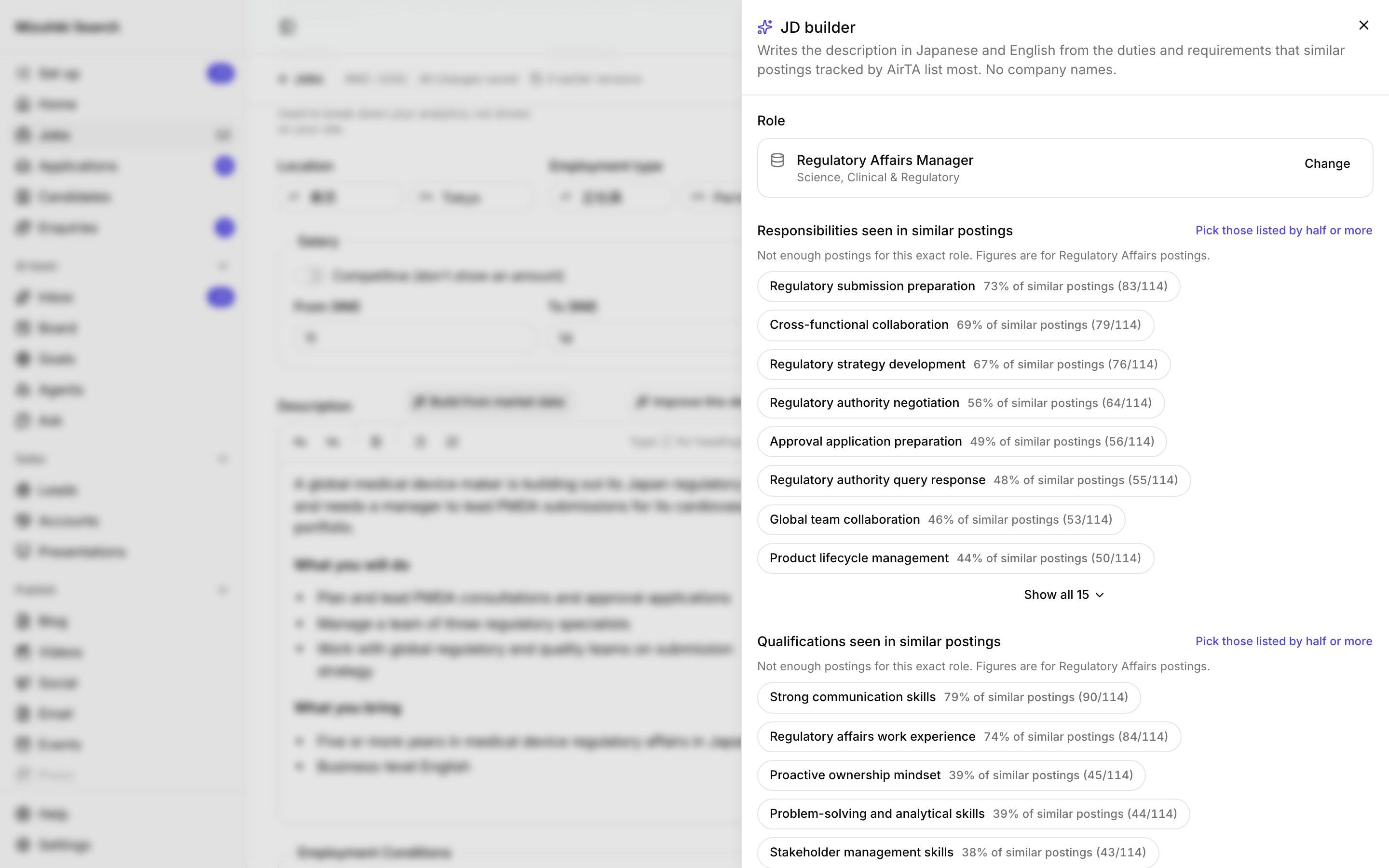
Job description builder
Built from What the Market Lists
Pick the role and tick the duties and requirements similar postings list, each with how often they appear in AirTA's data. Describe the client, never name them, and get the description in English and Japanese.
- Role suggested from your job title
- Duties and requirements with their share of similar postings
- Japanese written fresh, not translated
- Any number not in the job's own facts fails the draft
Open it liveImprove this description
Better Wording, Same Facts
See what similar postings list that yours doesn't, and the searches that found the job. A better version keeps every fact; anything that would change one is a proposal you confirm with the client first.
- Title never changes
- Salary never changes
- Location never changes
- Employment type never changes
- Dates never changes
- Wording, structure and search words rewritten for you
 Open it live
Job search
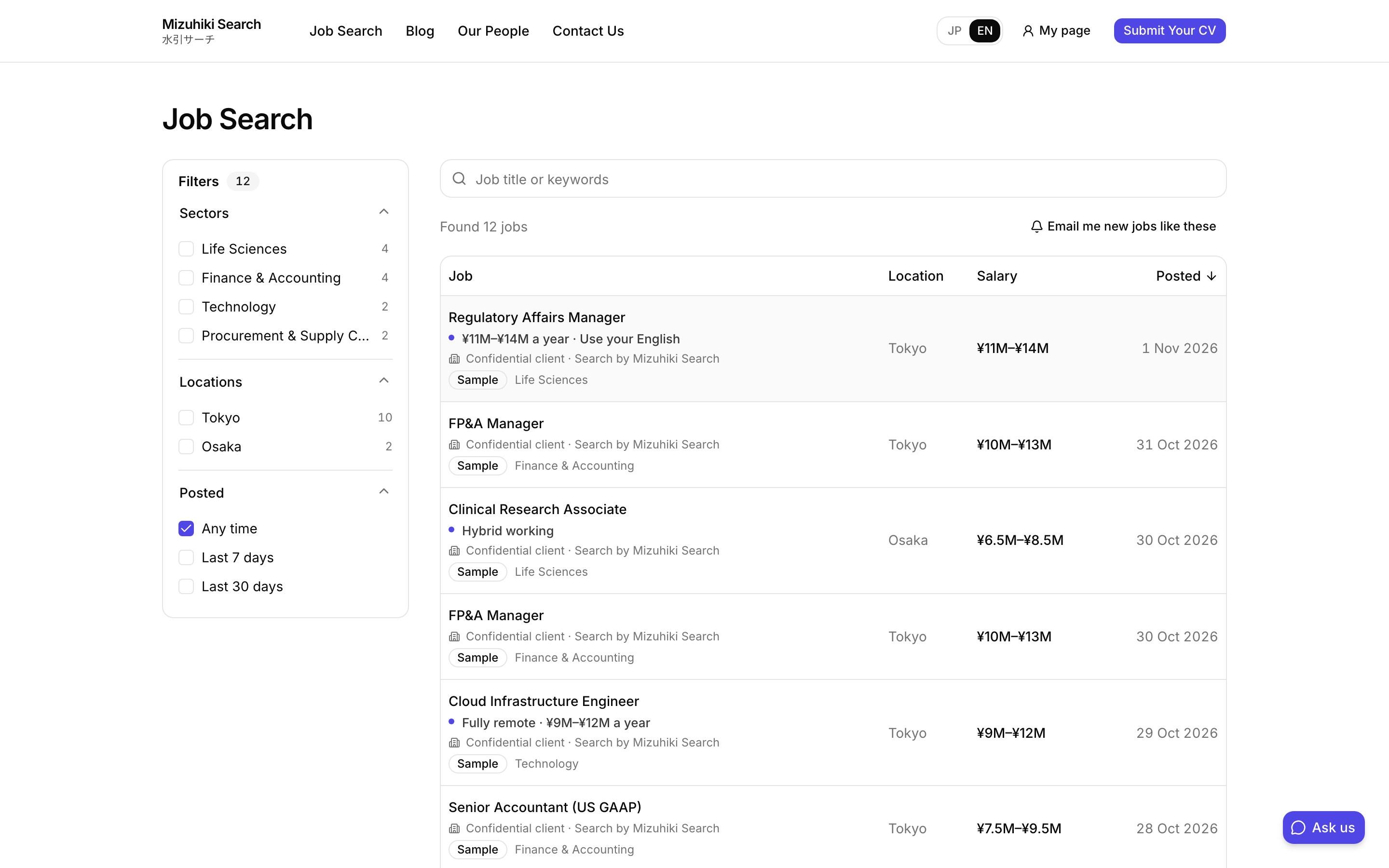
A Job List Candidates Can Filter, and a Page for Every Job
Sectors, locations and posting date, with counts beside each choice. Every job reads in Japanese and English, and a job past its end date leaves the site on its own.
- Email me new jobs like these turns a search into an alert
- Filters fold into one button on a phone
- Apply in one step, with a CV or LinkedIn
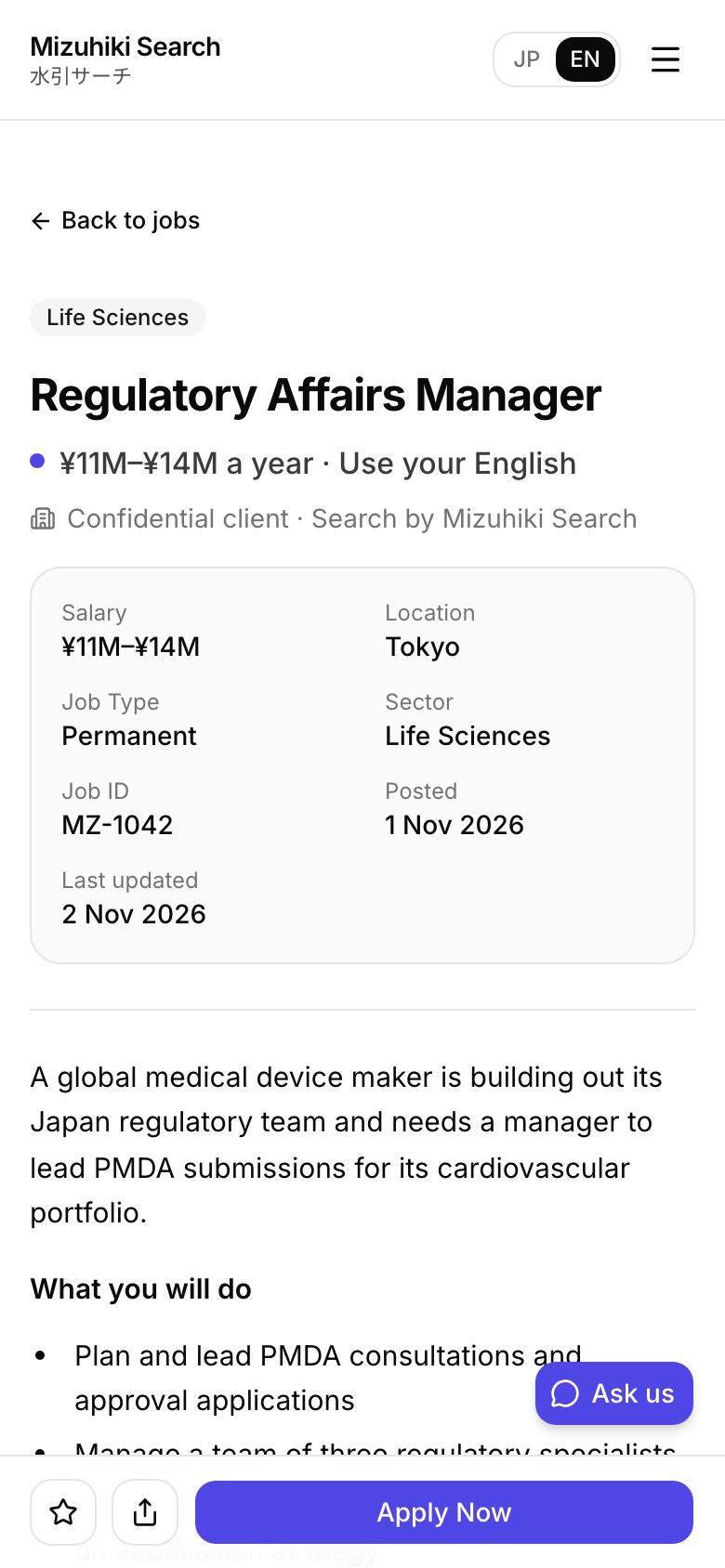
Open it liveGoogle for Jobs
Read by Google for Jobs, in Both Languages
Job pages often leave out the details search engines need to list them. Every page here sends all of them, in Japanese and English, with a readable address.
- Title and full description
- Date posted and end date
- Location, in Japan
- Salary in yen, per year
- Employment type
- The client's name, or confidential
 Open it live
CRM
Jobs In from Your CRM, Applications Back
Connect Zoho Recruit, Recruit CRM, Manatal, kintone, Tamago-DB or Bullhorn Recruitment Cloud through access your own admin gives. Jobs publish themselves, applications arrive in your CRM, and interviews, offers and placements come back wherever your CRM shares them.
- Jobs in within 10 minutes
- Applications kept and retried for 7 days if your CRM is down
- New jobs published when they pass the checks, or held for review
- Nothing in your CRM is ever deleted
Open it liveTeam alerts
New Applications in Slack, Teams and Chatwork
The right channel hears the moment an application or enquiry arrives, with a link into the admin. Chat messages never carry a candidate's name or contact details.
- Slack, Microsoft Teams, Chatwork or a signed webhook
- You choose which notifications each one gets
- Failed deliveries retried, with a test send to check
Open it liveJobs Editor
Confidential Stays Confidential
Agencies hide the client's name. The Jobs Editor checks every job every night for the client's name, and every title for a unique product, a landmark office or "the only company with…", and brings each one to you.
- Caught before candidates see it
- Each with the exact wording to change
- Duplicates, broken titles and misfiled sectors too
 Open it live
Who Works on Your Jobs
Meet the whole teamJobs Editor
Checks every job every night: duplicates, broken titles, jobs filed under the wrong sector and confidentiality leaks, each with a fix.
Compliance
Runs the accurate display checks on every publish. Rules in code, no AI involved.
Market Analyst
Shows the duties and requirements most market postings list that yours leave out.
See Your Jobs on It
We'll rebuild one of your live jobs as a full job page, with Google for Jobs data in both languages, on a private link.
Start free trial